CoreSample.AndroidForm
CoreSample.AndroidForm on GitHub
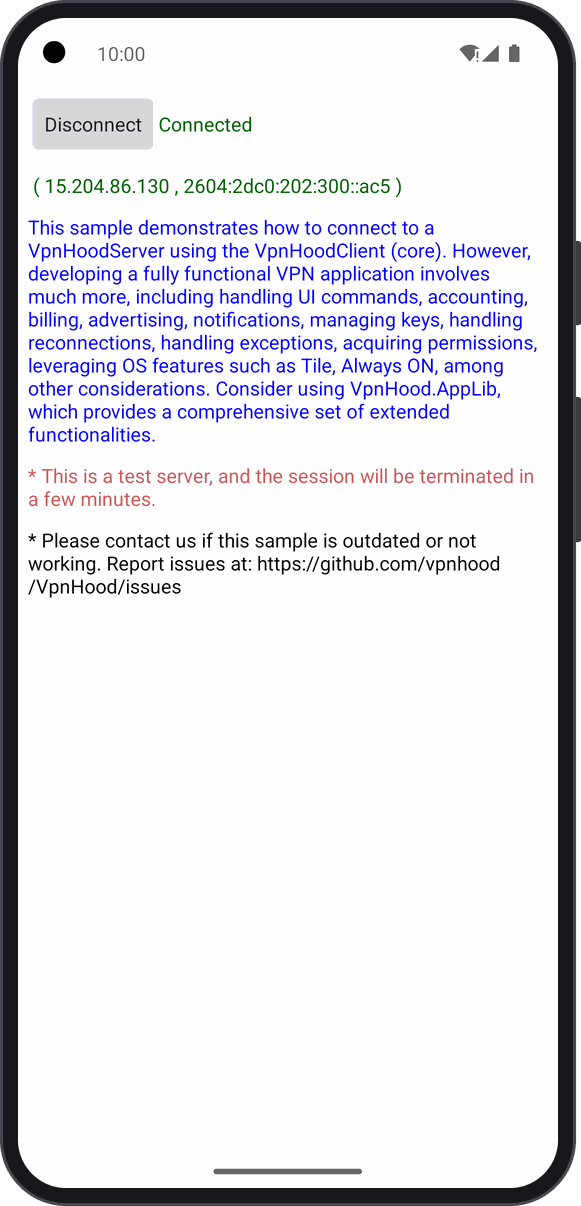
The VPN engine alone on Android, in a plain activity: Connect starts the VPN service through VpnServiceManager, the
engine in it connects to VpnHood's test server, and the page shows the connection's state and your public IP
addresses, the server's once connected.
Who it is for: you write an Android app in .NET for Android, without MAUI, with screens of your own, and handle access keys, reconnection and the rest yourself.
What you need
- An Android phone or emulator.
- The .NET SDK the project targets, with the
androidworkload.
Run it
In this folder, with the phone or emulator connected:
dotnet build -t:Run
The first Connect brings Android's connection request: OK lets the app make a VPN.
Read first
MainActivity.cs: ConnectTask starts the service with the client's options (VpnServiceOptions,
with the test server's access key, ClientOptions.SampleAccessKey), UpdateUi follows
VpnServiceManager.StateChanged, and OnResume hands the activity to the engine (AppUiContext.Context), so it can ask
for the VPN permission.
A whole VPN app needs much more: reconnection, keys, notifications, ads, billing. For that, see AppLibSample.MauiForm, or start from VpnHood.App.Template.