Build your VPN app

Start from VpnHood.App.Template: a repository that holds only your app, for Android, iOS, Windows and Linux. Every part of VpnHood comes into it as a NuGet package, so you neither fork nor build VpnHood itself, and taking a newer VpnHood means changing one version number.
Three steps to a running app
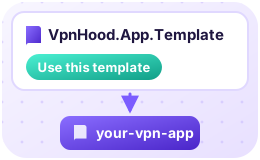 Use the template Choose Use this template on its GitHub page, then clone your copy.
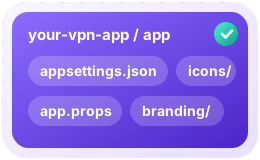 Make it yours Everything you change is in its
app/folder:app.props: your app's id base and name, your company and its version. The stores and every install know your app by the ids built from the base, so choose it before your first release.appsettings.json: its settings; a key you leave out is off.DefaultAccessKeyis the access key of the server your app connects to; keep it out of a public repository.branding/andicons/: your logo, the first-run privacy summary and your icons.
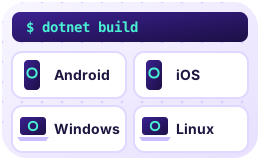 Build it Build each platform's head with
dotnet build, for exampledotnet build src/VpnApp.Windows.Web. A Debug build without an access key connects to VpnHood's sample server, so your first run needs no server of your own.
The template's README has every setting, what each platform's build needs, and how to publish.
Heads: one for each platform and store
A head is the project that makes one build of your app, for one platform and one store: the app you publish. It is small: it says who the app is and which of its store's services it uses - sign-in, billing, updates - and VpnHood's packages do the rest. The template has a head for each build:
| Head | The build it makes |
|---|---|
src/VpnApp.Android.Google |
Android, for Google Play: Google's sign-in, and Play's billing, updates and reviews |
src/VpnApp.Android.Web |
Android, an APK from your website: your portal's sign-in, checkout in the browser, and updates from your website |
src/VpnApp.Ios.Apple |
iOS, for the App Store: Sign in with Apple, and the App Store's billing, updates and reviews. Its VPN runs in a head of its own, src/VpnApp.Ios.Extension |
src/VpnApp.Windows.Web |
Windows, from your website: your portal's sign-in and checkout in the browser. Its VPN runs in src/VpnApp.Windows.VpnHost |
src/VpnApp.Linux.Web |
Linux, from your website, as on Windows. Its VPN runs in src/VpnApp.Linux.VpnHost |
Sign-in and purchases need your portal (PortalBaseUri in appsettings.json); without it the app has no account.
What every head says the same way - your settings, your premium tier, your files - is in src/VpnApp, which each of
them references. How a VpnHood app starts shows what a head writes.
Your own servers
Your app reaches your servers through the access key in DefaultAccessKey. To run them, see
the self-hosted VPN docs.
How it fits together
Each head stands on VpnHood's three layers: the user interface, the app's logic and the VPN engine. Each layer can be replaced on its own, and the networking packages beneath them work in any .NET application. VpnHood Client Architecture shows the layers, the contracts between them, and which part to use for what you are building.