API reference
Every public type and member of the VpnHood packages, from the doc comments that IntelliSense shows too. Search for a type at the top of the page, or browse the menu. Below is what each part of VpnHood is for.
Networking
Standalone .NET libraries for the network layer a VPN is built on. None of them needs a VPN: each one works in any .NET application.
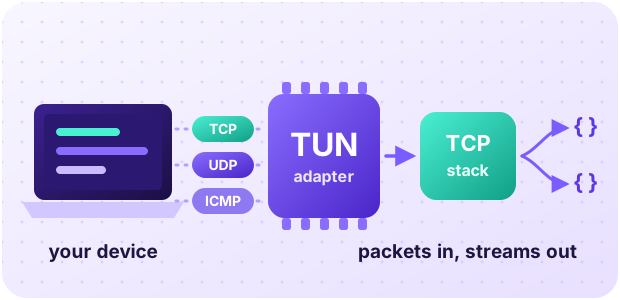
Capture a device's traffic
Open a TUN adapter on Windows, Linux, Android or iOS, and read and write the IP packets the system routes into it.
Net.VpnAdapters.Abstractions · Net.VpnAdapters.WinTun · Net.VpnAdapters.LinuxTun
Read and build IP packets
Parse IPv4 and IPv6 packets with their TCP, UDP and ICMP parts, build replies and fix checksums, in pooled memory.
Turn packets into streams
A user-space TCP stack ends the TCP connections carried in raw packets and gives you each one as a Stream.
Go through a proxy, or be one
SOCKS5, SOCKS4 and HTTP(S) proxy clients and servers, with authentication and UDP.
Locate an IP address
The country of an address, from online services or a local database.
VPN Core
The VPN itself: the client and server engines, the tunnel between them, and the parts that decide where traffic goes and who may connect.
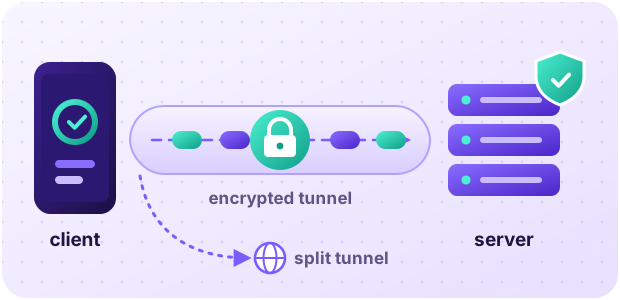
Run your own VPN server
Host a VpnHood server on your own machine, with its access keys kept in files and no control panel.
Core.Server · Core.Server.Access.Managers.FileAccessManagers
Connect from your own code
The client finds a server from an access key, builds a session with it, and runs the tunnel on a VPN adapter.
Split the tunnel
Send traffic around the VPN by country, IP range or domain, with filters on the client or the server.
Core.Filtering.Abstractions · Core.Filtering.Sqlite · Core.Filtering.DomainFiltering
Decide who connects
Write your own access manager: it admits sessions, counts their traffic and configures the server.
Reach servers through proxies
Connect through one proxy, or a managed list that rates and rotates its endpoints.
App Logic
Everything a VPN app does below its screens, the same on every platform. Your app adds the screens and a head for each platform, as the template does.
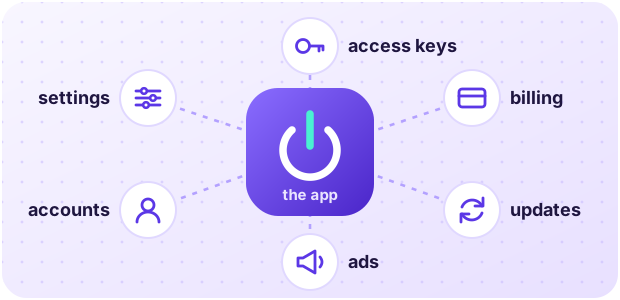
A VPN app without its screens
Connecting, servers and access keys, settings, profiles, accounts and ads, behind the API a UI reads the app through.
Sell premium
Billing through Google Play and the App Store, and accounts and web purchases through your portal.
AppLib.Stores.GooglePlay · AppLib.Stores.AppStore · AppLib.Portal
Keep it updated
Updates from Google Play, the App Store and the Microsoft Store, or a website APK that downloads and installs its own.
AppLib.Stores.GooglePlay.Core · AppLib.Stores.AppStore.Core · AppLib.Stores.MicrosoftStore.Core · AppLib.Stores.AndroidWeb
Show ads
AdMob's app-open, interstitial and rewarded ads, with Google's consent form.
Run on every platform
Android, iOS and tvOS, Windows as a service or a VPN plug-in, and Linux as a root service.
AppLib.App.Android · AppLib.App.Ios · AppLib.App.WindowsTun · AppLib.App.Linux
Drive the app from anywhere
The app's API over HTTP, for a web UI or a phone paired with the app.
App UI
The app's screens and the hosts that run them, from a phone to a desktop service.
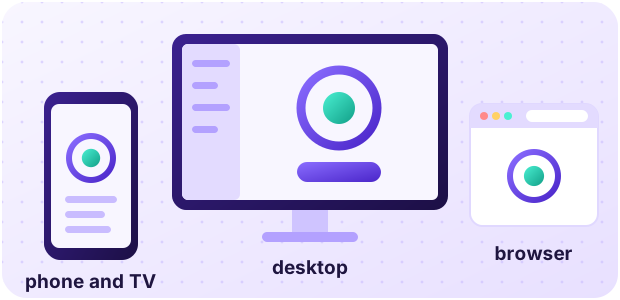
Use the ready UI
Host VpnHood's Avalonia UI on Android, iOS, Windows and Linux, or in a browser.
AppUi.Hosting.Avalonia · AppUi.Hosting.Avalonia.Android · AppUi.Hosting.Avalonia.Desktop
Install on a desktop
The app runs as a machine service, systemd on Linux or a LocalSystem service on Windows, with a window for each person who signs in, and updates itself.
AppUi.Hosting.Desktop.Daemon · AppUi.Hosting.Desktop.Linux · AppUi.Hosting.Desktop.WindowsTun
Bring your own UI
Any UI toolkit gets the app's state, the words of every language, and the text for errors, dates and traffic.
Web views and MAUI
Host a web UI in a native web view on Android, iOS and Windows, or a .NET MAUI UI.